Education Website Monitoring: Protect Classes and Exams
Learn how education website monitoring helps protect online classes, exams, learning platforms, and student logins from unexpected downtime. Discover practical ways to detect issues early and maintain reliable access for students and educators.
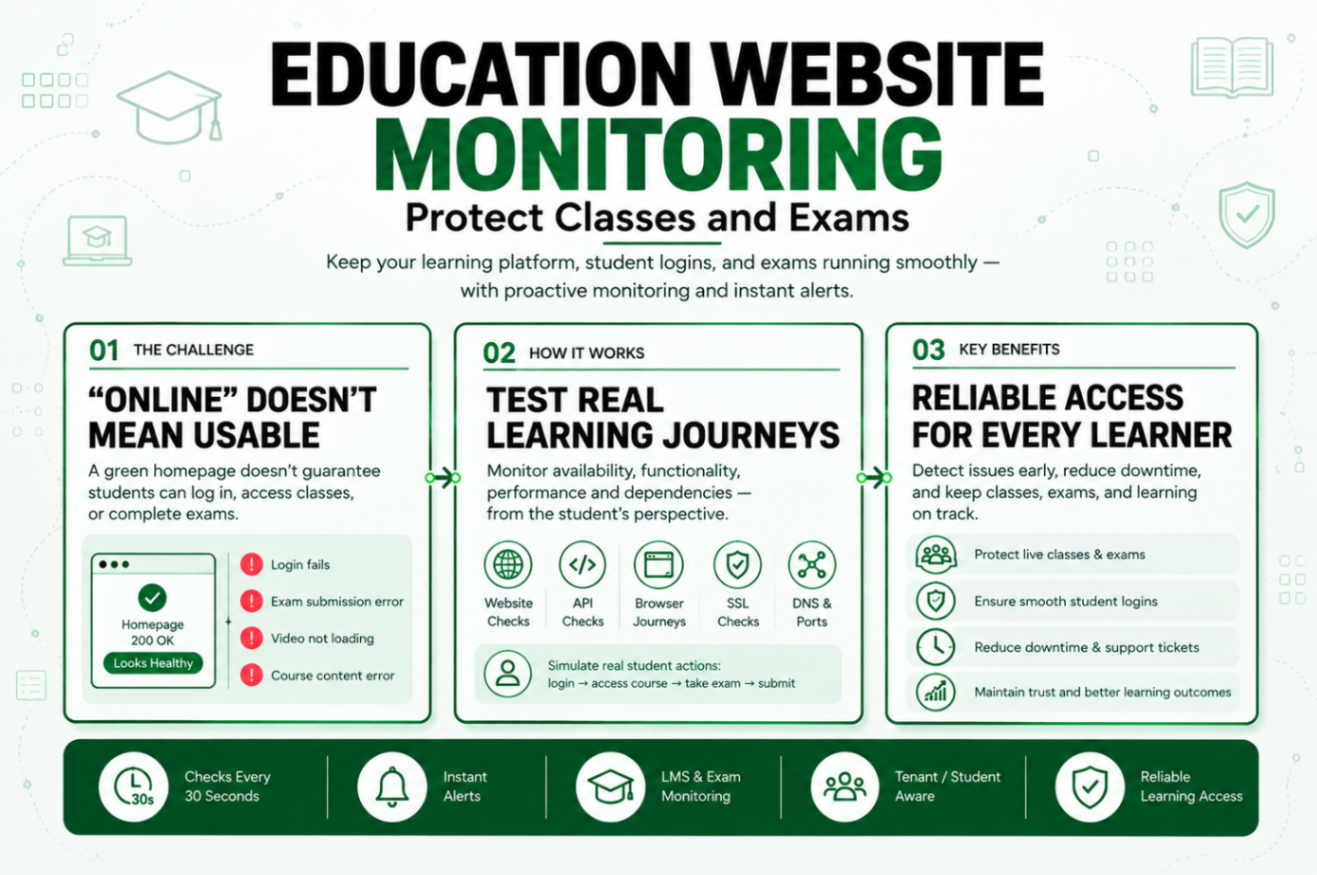
Statixoup is an all-in-one monitoring platform for websites, APIs, SSL certificates, DNS, ports, and browser journeys. For edtech teams, universities, training providers, and LMS administrators, it can check availability every 30 seconds and capture incident evidence when a workflow fails. That matters in a sector where 10.76 million US postsecondary students took at least one distance education course in fall 2024, according to the National Center for Education Statistics.
The short answer is simple. Education website monitoring checks whether students can reach, sign in to, and complete key actions on a learning platform. A useful setup combines uptime, API, browser, DNS, SSL, and performance checks, then routes alerts to someone who can act before a class or exam is disrupted.
The Problem: “Online” Doesn’t Mean Usable
Students don’t report “a partial identity-provider dependency failure.” They say, “I can’t log in,” “my exam won’t submit,” or “the video keeps freezing.” Meanwhile, a basic uptime check may insist everything is fine because the public homepage loaded.
This is the uncomfortable part: an education platform can be technically online and operationally broken. The login API can time out. A single sign-on redirect can loop. The exam service can accept answers but fail on final submission. A content delivery network can serve the shell while course files return errors. Weak education website monitoring misses these failures because it watches pages instead of outcomes.
The risk also changes by the calendar. A ten-minute issue at 2:00 a.m. in a quiet week isn’t the same as a ten-minute issue during admissions, enrolment, a live class, or a timed exam. Good monitoring has to understand that difference.
That is why education website monitoring needs event-aware coverage instead of one permanent alert profile.
How Education Website Monitoring Works
Education website monitoring is a layered process that tests availability, function, speed, and dependencies from outside the platform. Each layer answers a different question. Together, they tell the operations team whether students can actually learn.
Start With Availability, Then Go Deeper
An HTTP check is still useful. It should confirm the expected status code, response time, TLS validity, and a known phrase in the response body. The phrase matters. Without it, a branded maintenance page or proxy error can return 200 and pass a shallow check.
Set separate checks for the public site, LMS, identity endpoint, exam service, course-content host, and critical APIs. If the LMS depends on a payment service for enrolment or an email service for one-time login codes, monitor those paths too. This is where webhook delivery monitoring becomes relevant for enrolment events, grade exports, and external learning tools.
That layered education monitoring model also stops one healthy component from hiding a broken dependency.
Here’s my view: one “homepage is up” check is almost worse than no check. It creates confidence without coverage.
LMS Uptime Monitoring Needs Real Student Login Checks
LMS uptime monitoring should include a browser journey that behaves like a student. The journey opens the login page, enters a synthetic account, follows the single sign-on redirect, confirms the dashboard, opens a test course, and signs out.
Why use a synthetic account? Because monitoring shouldn’t touch real student records. Keep the account free of personally identifiable information, enrol it only in a dedicated test course, and prevent it from sending messages or submitting work into production classes.
For that reason, privacy rules belong in the education website monitoring design from day one.
OWASP’s guidance on security logging and monitoring failures says login failures and other auditable events should be logged, and alerts need effective thresholds and escalation. Its underlying dataset recorded 53,615 occurrences across the weaknesses mapped to that category. External education website monitoring and internal security logs solve different problems, but incident diagnosis is much faster when both tell the same story.
Don’t Put Student Data in the Monitor
Use generated names, a dedicated mailbox, and a test course with dummy files. Mask credentials in screenshots and logs. Keep response bodies out of alerts unless they’re scrubbed. Privacy-safe monitoring means proving the workflow works without collecting the student data that workflow handles.
Document those safeguards alongside the education monitoring runbook.
Online Exam Monitoring Has a Different Risk Profile
An exam flow needs more than a login. Test the exam landing page, eligibility check, attempt creation, autosave endpoint, timer sync, and final submission response. Don’t run destructive submissions against a real assessment. Use a permanent synthetic exam created for monitoring, or stop before the final write if the platform can’t isolate test data.
During a scheduled exam window, make checks more frequent and alert sooner. A practical starting point is every 30 to 60 seconds for the exam entry and submission APIs, then a browser journey every two to five minutes. Tune that against platform load and vendor limits. Online exam monitoring shouldn’t become the traffic spike it is meant to detect.
The best education monitoring schedule follows academic risk, not a fixed calendar setting.
Use this process:
- Map the student journey from login to submission.
- Mark every internal and third-party dependency.
- Create safe synthetic data.
- Test each endpoint and the full browser path.
- define warning and critical thresholds.
- route alerts by service owner.
The result is education website monitoring that finds the broken step, not just the broken domain.
Course Platform Performance Needs Thresholds With Meaning
Response time isn’t a single universal number. A public course catalogue should feel fast. A grade export may legitimately take longer. An exam autosave, though, has almost no room for delay.
Useful education website monitoring gives each of those actions its own baseline and threshold.
Set thresholds per workflow:
- Public site: alert on repeated availability failure or a sharp response-time increase.
- Student login: warn when the complete browser journey exceeds the normal baseline; escalate when login fails twice from separate locations.
- Exam autosave: treat failed writes and response time beyond the exam team’s tested tolerance as critical.
- Video or course content: check manifest and file availability from regions where students actually connect.
- APIs: validate both status and response schema, not status alone.
And baseline first. A fixed two-second alert on a workflow that normally takes 1.9 seconds will be noisy. A five-second alert on an autosave that normally finishes in 250 milliseconds may be dangerously slow.
Revisit each education website monitoring baseline after a major release or infrastructure change.
Diagnose Dependencies Before the Alert Reaches the Lecturer
The monitor should attach evidence: failed step, timestamp, region, status code, latency, screenshot, and recent timeline. If the failure looks network-related, traceroute or MTR data helps separate the application from the route to it. Statixoup’s SSH monitoring guide also shows why service-level checks matter when administrative access must remain available during an incident.
Notification ownership needs the same precision. Identity failures go to the identity team. Exam submission failures go to the assessment platform owner. Broad student impact also goes to support and communications. When users need updates, a custom-domain status page gives them one trusted place to look.
That connection between evidence and ownership is what turns education monitoring into an incident response system.
A Realistic Exam-Week Monitor Setup
Consider this clearly labeled hypothetical. A training provider expects 4,000 learners to sit a certification exam between 10:00 a.m. and noon. Its stack includes a public website, a hosted LMS, an external identity provider, a custom exam API, object storage for question media, and an email service for login codes.
This is exactly the kind of high-risk window where education monitoring earns its place.
The old setup checks only the public website every five minutes. That check passes while some candidates receive a blank exam page because the question-media URLs are returning 403 responses.
The revised education website monitoring plan looks like this:
| Monitor | Check frequency | Validation | Alert owner |
|---|---|---|---|
| Public site | 60 seconds | Status, text, latency, SSL | Web operations |
| LMS login API | 30 seconds | Status, schema, token response | LMS team |
| Student browser journey | 2 minutes | Login, dashboard, test course | Identity and LMS teams |
| Exam API | 30 seconds | Eligibility and synthetic attempt read | Assessment team |
| Question media | 60 seconds | Known file loads with correct type | Platform team |
| Submission canary | 2 minutes | Synthetic answer save in test exam | Assessment team |
| Status page | 60 seconds | Public incident page loads | Communications |
At 9:42 a.m., the browser journey fails at question media while login and the exam API pass. The alert contains the failed URL, region, and screenshot. Operations routes it to the storage owner before candidates arrive. That outcome is hypothetical, not a Statixoup customer claim, but it shows the difference between finding “the site is down” and finding the exact student-facing failure.
In other words, education website monitoring narrows the incident before the first support ticket has to explain it.
If an incident does reach users, don’t improvise every update. Prepare messages using these incident communication templates, then send channel-specific updates through the platform’s status page notifications.
Best Practices for Reliable Student Access
Cover the Workflow, Not the Organisation Chart
Build checks around student actions because students experience one connected journey. Internal service boundaries won’t help when a login works but course launch fails.
Keep the education monitoring map centred on outcomes such as “student can start exam,” not internal server names.
Change Frequency Around the Academic Calendar
Increase education website monitoring before enrolment deadlines, live cohorts, result releases, and exam windows. Run the higher-frequency profile early enough to expose capacity or vendor-limit problems before the event.
Confirm Before Paging
Validate a failure from a second location or with a quick retry because transient network loss happens. But keep the retry short. Ten minutes of “confirmation” during a 60-minute exam is not caution. It’s delay.
Tune confirmation rules so education website monitoring reduces noise without hiding real student impact.
Give Every Critical Alert an Owner
Write the owner, backup, and escalation time into the runbook. Alerts sent to a shared inbox with no duty rota are records, not responses.
Separate Public Updates From Internal Evidence
Students need impact, scope, workaround, and the time of the next update. Engineers need logs, screenshots, response data, and dependency detail. Keep both views connected, but don’t publish raw diagnostics or personal data.
Good education website monitoring supports both audiences without mixing their information.
Common Monitoring Mistakes on Learning Platforms
Checking Only for HTTP 200
It happens because it is easy. Replace it with content assertions, schema validation, and browser journeys for critical flows.
Using a Real Student Account
This exposes personal data and can pollute grades, messages, and audit records. Use an isolated synthetic account and course instead.
Treating Every Minute the Same
A quiet Sunday and a final exam need different thresholds. Schedule profiles around known high-risk windows.
Sending Every Alert to Everyone
Broad routing creates alert fatigue. Map each monitor to a primary service owner, then add support and communications only when student impact crosses a clear threshold.
Review education monitoring routes before each major term because teams, vendors, and escalation contacts change.
Ignoring Silent Background Jobs
Course enrolment sync, result publication, certificate generation, and reminder emails can fail without breaking the LMS homepage. Add heartbeat checks, as explained in Statixoup’s guide to cron job monitoring.
Those silent processes belong in the same education monitoring coverage map as visible pages and APIs.
The Reliability Gain That Matters
The best education website monitoring setup doesn’t create the most alerts. It creates the earliest useful alert, with enough evidence and ownership for someone to act.
Start with the three journeys students can least afford to lose: login, course access, and exam submission. Measure them end to end. Then widen coverage to the dependencies and background jobs that keep those journeys alive.
That sequence keeps education website monitoring focused, practical, and tied to student access.
Start a 30-Day Statixoup Beta
Start your 30-day Statixoup beta and configure one critical education workflow first. Choose student login, course access, or exam submission. Add endpoint checks, a privacy-safe browser journey, a clear owner, and an escalation path before the next high-risk academic window.
Start a 30-Day Statixoup BetaPost a Comment

Hardik Vaghani
Hardik Vaghani is a Digital Marketing Professional and SEO Strategist based in Surat, Gujarat, India. He currently works with Ethnic Infotech, contributing to SEO, content marketing, technical SEO, and digital growth strategies. Hardik also creates blog content for Fusion5, focusing on technology, laptops, and consumer electronics. With expertise in SEO, Google Ads, Meta Ads, Local SEO, and Content Strategy, he helps businesses improve online visibility, rankings, and lead generation through data-driven marketing.
Frequently Asked Questions
Related Blogs